
 English EN
 French FR
 German DE
 Portuguese PT
 Spanish ES
 Russian RU
 Japanese JA
 Korean KO
 Arabic AR
 Greek EL
 Turkish TR
 Italian IT
 Polish PL
 Hindi HI
 中国 CN
中国 CN
.webp)
Bubble-Free UV DTF Stickers on Curved Products | Guide
Learn how to apply UV DTF stickers to tumblers, bo...
MoreUsing DTF transfer film successfully means controlling the whole transfer system: the coated PET carrier, DTF ink, adhesive powder, curing equipment, heat press and fabric. Print on the designated receiving side, apply powder while the ink can accept it, cure the adhesive, then transfer the image to a compatible textile and peel at the stage specified for that film grade.
This guide is for print shops, transfer producers and buyers qualifying a DTF film for production. It explains how to choose the film, set up a repeatable process and locate defects before changing materials or press settings. The process described here is textile DTF with hot-melt powder; UV DTF adhesive-film systems follow a different workflow.
Key Takeaways
Identify the grade before using the roll. Printable side, feed format, peel type and equipment compatibility are part of the specification.
Treat curing and garment pressing separately. The curing unit prepares the adhesive; the press bonds the finished transfer to fabric.
Find the stage where a defect first appears. Check the unpowdered print, powdered film, cured transfer and finished textile in that order.
Qualify the full combination. A film that releases cleanly still needs transfer, appearance and wash checks on the intended fabric.
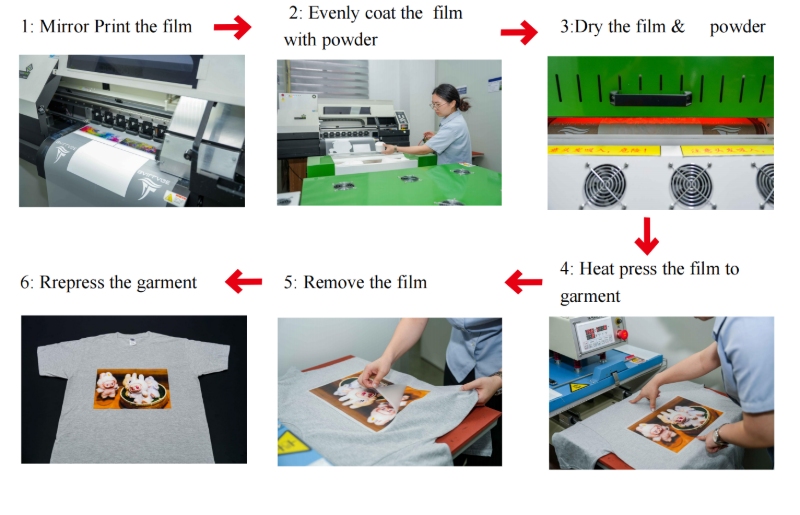
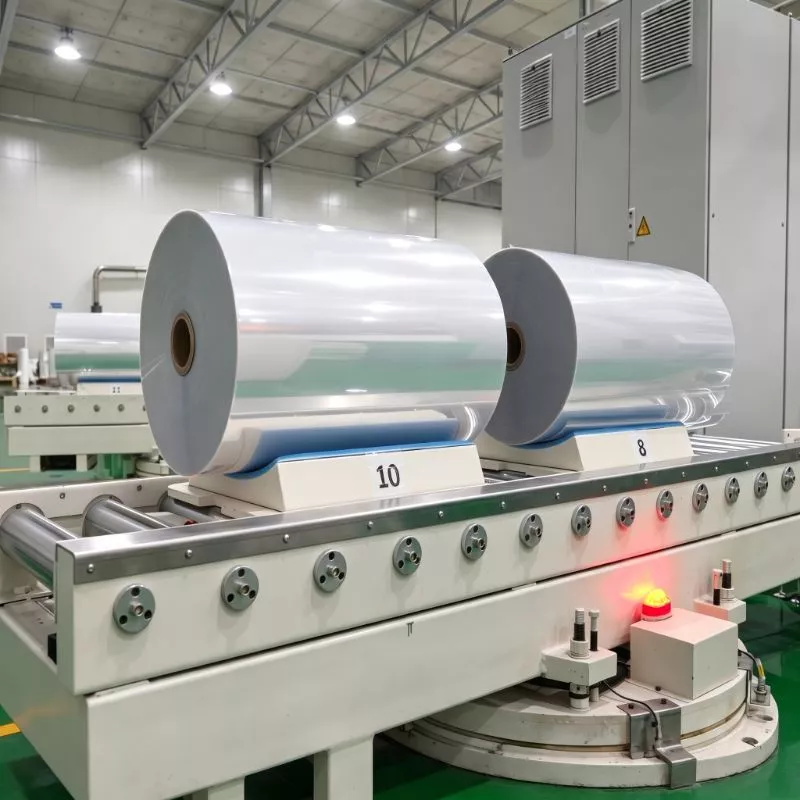
DTF transfer film temporarily carries the printed design through printing, powder application, curing and heat transfer. Its receiving surface must accept the intended ink deposit, and its release behavior must allow the image to separate at the correct peel stage. The PET carrier is removed after pressing; it is not the layer worn on the garment.
Three materials have different jobs. The film supports printing and release. The ink forms the color image and white backing. The hot-melt powder becomes the adhesive layer that bonds the image to fabric. Changing one material can change the process window even if the other two stay the same.
A typical workflow is: identify and load the film → prepare the RIP job → print color and white → apply and clear powder → cure → inspect and store the transfer → heat press onto fabric → peel → finish and test.
For a garment-order walkthrough covering artwork approval, shirt positioning and finished-shirt inspection, follow our step-by-step guide to making and applying DTF transfers to T-shirts.
Match sheet dimensions or roll width to the printer's supported media path. Check roll core, winding direction and usable print width as well as the width printed on the carton. A nominally suitable roll can still feed poorly if its winding, flatness or backing friction does not suit the equipment.
Film thickness affects handling, but it is not a stand-alone measure of print quality or wash durability. Compare feeding stability and transfer results on your own line rather than assuming that a thicker carrier produces a better finished garment. Check the supplied lot for edge damage, uneven winding and contamination before loading it.
Identify the ink-receiving side from the roll label, packaging or grade instructions. Do not rely on “matte side up” as a universal rule: both faces may look matte, and a matte reverse surface does not automatically mean both faces are printable.
If the side is unclear, stop before running a full job and confirm it with the supplier. Use an approved small print check rather than scratching or repeatedly touching the coating. A clean surface is important because fingerprints and dust can cause localized defects that resemble a coating problem.
| Peel description | What the operator must control | What the description does not establish |
|---|---|---|
| Hot peel | The specified peel stage after the press opens and a repeatable removal motion | A universal press temperature, curing recipe or cooling time |
| Cold peel | Full cooling before carrier removal, with space to cool transfers without distortion | Automatic suitability for every heat-sensitive textile |
| Warm peel | The supplier's defined cooling stage before removal | Permission to substitute immediate hot peeling |
| All-time or full-time peel | The release windows actually confirmed for the grade and qualified system | Identical results at any temperature on any garment |
On smaller screens, swipe horizontally to view all columns.
SAILLAGE's 75 μm TD7007 dual-sided matte DTF film is listed with hot/cold peel options. That is a grade-specific specification; confirm the supplied lot's instructions and validate the selected peel route with your ink, powder and textile before production.
Define the target application before approving a film sample: cotton promotional T-shirts, polyester teamwear, stretch garments or another textile. Check the whole transfer system for adhesion, hand feel, stretch response and color stability on that material.
High-dye polyester may need attention to dye migration, while coated or water-repellent fabrics may need a different adhesive solution. Cold peel describes carrier release, not a lower heat requirement. Likewise, a film's clean powder release does not establish compatibility with every fabric treatment.
Keep unused film in its protective packaging, away from direct sunlight, heat, dust and moisture. Follow the grade's storage conditions and shelf-life guidance. Close opened packaging between runs and retain the lot label so a problem can be traced to a specific roll.
When material moves between significantly different environments, follow the supplier's conditioning procedure before opening and loading it. Condensation and contaminated surfaces can make otherwise usable materials difficult to evaluate. Do not set a universal workshop humidity number without checking the printer, ink, film and powder requirements together.
Handle the edges. Avoid fingerprints on the printable area and keep loose powder away from unused film.
Protect the feed path. Clean the platen and guides using the printer's approved method; do not introduce unapproved cleaners to the coating.
Keep rolls identified. Separate grades and lots so peel instructions and test results remain attached to the right material.
Inspect before use. Set aside damaged, contaminated or visibly distorted sections instead of letting them run under the print carriage.
Use the printer's supported textile DTF workflow. In a conventional transfer, mirrored color is printed onto the film with white behind it in the final garment view. The RIP's print sequence and white-layer settings must match the equipment and ink system.
Check mirroring with readable text, preview the white coverage, and inspect small gaps and fine edges. Too much white beyond the color can create a fringe; missing backing can change the appearance on a colored textile. Use a qualified media profile rather than compensating for a poor print by simply increasing ink density.
Run the prescribed nozzle check and white-ink maintenance routine. Missing nozzles, alignment errors or unstable ink delivery can produce defects on every roll. Keep a known-good sample to compare against the candidate film under the same settings.
Print a test pattern containing fine text, large solids, gradients and white-to-color edges. Inspect it before adding powder. Record pooling, pinholes, streaks or edge movement at this stage; once powder is applied, it is harder to tell where the defect began.
Load the film squarely and set tension, media clearance and take-up according to the printer instructions. Watch the leading edge and the transition into any downstream shaker. Curl, skew or contact with guides can smear a wet image even when ink reception is otherwise acceptable.
Keep hands and tools away from the wet print. Check the film across its width and over a sustained run, not only on the first small patch. If a defect repeats at a regular interval, inspect the relevant rollers and contact points as well as the film surface.
Use powder specified for the intended DTF system and textile application. Apply it while the printed layer is receptive, covering the image evenly. Remove loose excess from the unprinted film and from internal openings in the design before curing.
Inspect fine text separately from large solid blocks. Powder that bridges narrow spaces can reduce detail, while uncovered printed areas can leave weak bonding zones. On an automated line, balance powder delivery and shaking with the actual print speed; on a manual station, use a repeatable coating and clearing method.
Keep the handling area contained and use extraction and protective measures required by the powder safety data sheet and equipment instructions. Avoid creating airborne dust. Reclaim powder only through an approved process that excludes contamination, moisture and mixed grades.
If powder remains outside the image, inspect static, moisture, handling marks, powder condition and clearing settings. Do not start by adding more heat: unwanted powder can melt into a visible halo that later transfers to the fabric.
Curing fuses the adhesive on the printed film before garment application. Use the material supplier's starting instructions and qualify them on the actual curing equipment. Heater setpoint, heat at the transfer and exposure time are related but different measurements.
On a conveyor line, belt speed and heated length affect dwell time. On a stationary unit, position and loading can affect uniformity. Record enough information to reproduce the approved condition rather than recording only the control-panel temperature.
Look for an evenly fused adhesive layer without loose granules, severe curl or discoloration. The exact surface appearance can vary with powder and film, so “glossy” is not a universal cure specification. Check the cured transfer at both edges and in dense white areas, then verify bonding on fabric.
Insufficient cure, excessive heating and uneven heating can create different problems. If a sample fails, compare one controlled adjustment at a time and retain the sample. Do not attempt to hide an unqualified cure by increasing the garment-press time across the whole order.
A finished transfer still needs a qualified garment-application recipe. There is no single temperature-and-time pair that applies to every film, powder, press and textile. Use a written recipe with separate fields for each stage.
| Stage | Record these controls | Acceptance check |
|---|---|---|
| Film printing | Film grade/lot, printer, ink, media profile, white coverage and feed setup | Complete image, stable edges and acceptable white registration |
| Powder application | Powder grade/lot, application method and excess-removal setup | Even image coverage and clean unprinted areas |
| Curing | Equipment, setpoint, verified heat/exposure method, dwell or belt speed | Consistent fusion without unacceptable distortion |
| Garment pressing | Fabric/style/color, press model, temperature, dwell, pressure setup and cover method | Even bonding without unacceptable fabric marks |
| Peel and finishing | Hot/warm/cold route, removal method and any finishing-press instructions | Clean release, retained fine detail and approved surface appearance |
On smaller screens, swipe horizontally to view all columns.
Do not copy a curing temperature into the garment-press field. Do not treat a pneumatic pressure reading as a universal pressure at the fabric: equipment geometry and contact area also matter. Reproduce the setup that passed the sample test.
When testing hot and cold release on a grade that supports both, keep the other variables fixed. Compare fine-detail retention, release consistency and finished appearance, then choose the route that fits the qualified production process. A faster peel alone is not proof of a faster complete order.
Use the following table to decide what to inspect first. A symptom can have more than one cause; these checks narrow the investigation rather than diagnose a roll from appearance alone.
| Symptom | First stage to inspect | Checks and a controlled next step |
|---|---|---|
| Ink beads or pools before powdering | Film loading and printing | Verify the printable side, surface cleanliness and profile; compare a small patch with known-good film |
| Missing white or repeated banding | Printer and RIP | Run nozzle and alignment checks; inspect ink delivery before changing powder or press settings |
| Wet image smears during feeding | Media transport | Check curl, clearance, tension and contact points along the output path |
| Powder remains outside the artwork | Powdering and handling | Check static, moisture, contamination and excess-removal settings before curing |
| Granules remain after curing | Adhesive coverage and curing | Check the specified powder, heat exposure and dwell; compare controlled cure samples |
| Film curls or changes color in the dryer | Curing and media condition | Verify actual exposure, support and material compatibility; pause the run if the film risks contacting equipment |
| Fine details lift with the carrier | Peel and bonding, then earlier stages | Confirm release timing, press contact and adhesive coverage; inspect whether those details were present before pressing |
| Edges lift only after washing | Complete transfer-and-garment system | Review cure, press consistency, fabric compatibility and care conditions against a retained sample |
| White changes color on polyester | Textile and transfer compatibility | Investigate dye migration and whether the transfer system is suited to that dyed fabric |
On smaller screens, swipe horizontally to view all columns.
For a useful investigation, keep a piece of the suspect roll, the unpressed transfer and the finished garment. Share the material lots, printer/profile, powder, cure record and press recipe with the supplier. A photo of the final defect without process information rarely identifies the cause.
After curing, let transfers cool before stacking or packing. Protect the adhesive surface from dust, folding, abrasion and unintended contact with other prints. Follow the transfer system's approved packing method and storage limit; unused-film storage guidance does not automatically establish the shelf life of a printed transfer.
Label finished transfers with the job, production date, material lots and application instructions. Keep different peel types visibly separated. Before using stored stock, inspect it and press a representative sample rather than assuming release and adhesion are unchanged.
When qualifying a new film, run a small test matrix that includes the artwork features and textile types you actually sell. Change one material or setting at a time. Compare print quality, clean powder release, cure consistency, peel behavior, finished feel and performance after the agreed wash procedure.
1.Define the target. List the printer, ink, powder, textile and quality requirements for the intended job.
2.Run the comparison. Test the candidate and reference film under recorded, comparable conditions.
3.Approve the garment result. Include cooled inspection and the required wear, stretch or wash checks for that application.
4.Freeze the recipe. Keep the approved settings, reference samples and change-control notes with the film grade.
For material screening, start with the SAILLAGE DTF film range and identify the textile DTF grades that suit your equipment. Share the printer, ink, powder, target fabric and preferred peel workflow when requesting samples so the evaluation has a defined purpose.
Print on the ink-receiving side specified for the film grade. Do not identify it solely by gloss or matte appearance, particularly on films with matte surfaces on both faces. Confirm the loading direction before printing a full job.
Ordinary uncoated PET should not be treated as an equivalent DTF carrier. Textile DTF needs a surface designed for the ink-receiving and release requirements of that transfer system, together with compatible ink, powder and equipment.
No. Curing prepares the adhesive on the printed film. Heat pressing later bonds the finished transfer to the textile. They use separate equipment conditions and must be recorded as separate stages in the process recipe.
Not necessarily. Cold peel specifies that the carrier is removed after cooling. The required press temperature, time and pressure come from the complete transfer system and fabric qualification, not from the peel label alone.
Possible contributors include static, moisture, contaminated film, powder condition and insufficient excess removal. Inspect the film before curing and compare a controlled sample. Extra heat will not remove unwanted powder and may fix it onto the carrier surface.
Use the storage period and packing conditions qualified for the printed transfer system. The shelf life of unused film does not establish the life of a printed, powdered and cured transfer. Label production lots and test stored transfers before releasing a garment order.
Select the most popular foreign trade service products to meet your diverse needs
Select the most popular foreign trade service products to meet your diverse needs

Tel: +86 17706217416
Add: Building L2A, No. 520, Lane 1588, Zhuguang Road, Hongqiao World Center, Qingpu District, Shanghai, China






User Comments
Service Experience Sharing from Real Customers
James Wilson
Apparel Shop OwnerThe DTF transfer film is incredibly easy to use! The process from printing to pressing is straightforward, and the colors come out vibrant and durable on my cotton t-shirts. A game-changer for my small custom clothing business.
Sophia Chen
Graphic DesignerAs a designer, color accuracy is crucial. This DTF film delivers excellent detail and true-to-design prints. The instructions were clear, making the transfer process smooth even for complex designs. Highly recommended for creative professionals.
Marcus Johnson
Production ManagerWe've integrated this DTF transfer film into our mid-scale production line. The consistency and quality are outstanding, significantly reducing waste and reprints. It's reliable, efficient, and has improved our turnaround time for custom orders.
Elena Rodriguez
Craft Workshop InstructorI use this DTF film in my DIY craft workshops. It's user-friendly for beginners, and the results are professional-looking. The transfers adhere perfectly to various fabrics like tote bags and hats, making projects fun and successful for everyone.